THE PROBLEM
You're reading an old message. You scroll up, another page of history loads, and the message you were reading is suddenly somewhere else on the screen. Almost every chat app has fought this bug.
The cause is simple. A scroll view remembers its position as a single number, contentOffset.y: the distance from the top of the content to the top of the screen. Insert older messages at the top and every existing row is pushed down, but that number stays the same. It now points at the new rows.
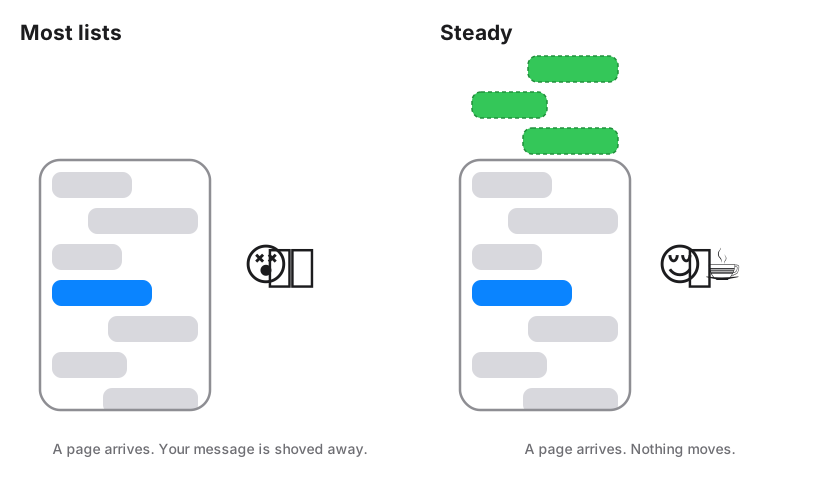
The usual fixes all correct the jump after it happens:
- Measure, insert, shift back: Move the offset down by the inserted height. It works until a cell resizes, an image loads, or a second page lands mid-fling. Then the correction races the layout and the list twitches.
- Flip the list upside down: A prepend becomes an append, so it no longer jumps. But context menus and insert animations now have to be un-flipped by hand.
- SwiftUI's
scrollPosition(id:): Restores the position by row identity. In a lazy stack the rows above haven't been measured yet, so the restore is built on estimated heights.
THE IDEA
Steady doesn't correct the scroll position. It makes sure there is never anything to correct.
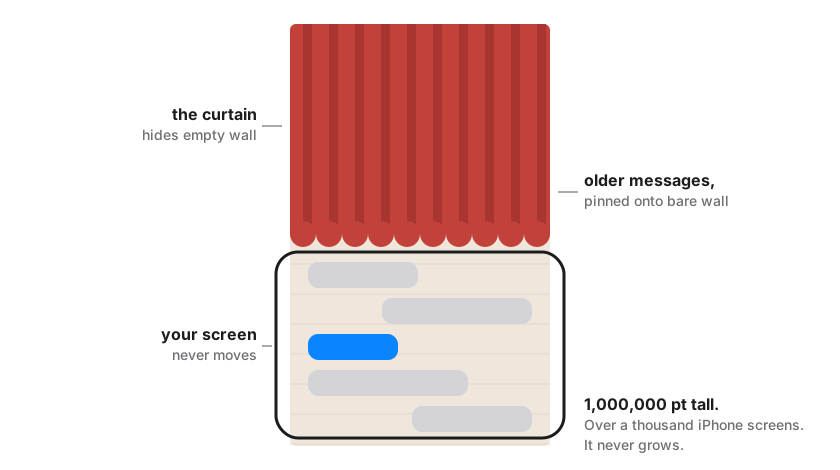
The list lives on a canvas that is 1,000,000 points tall and never grows. The first message is pinned at its middle. Older messages are laid out upward from there, newer ones downward. The empty canvas above and below is hidden behind negative content insets, so you can only scroll where messages actually exist.
When an older page arrives, its rows are placed in the empty space above the first message. Existing rows keep their exact coordinates, the top inset shrinks to reveal the new rows, and the scroll offset is never touched. The message you're reading has no reason to move.
IN ACTION
THE EXAMPLE APP
Scrolling back through a long conversation while older pages stream in from a mock server. Each page lands above the screen and the message under your thumb stays exactly where it was. No flicker, no snap back.
The example app ships in the repo, so anyone evaluating the package can run it and try to break it.
SEE IT STEP BY STEP
An interactive breakdown I built to explain the bug and the fix. It compares three approaches: a plain ScrollView, SwiftUI's scrollPosition(id:), and Steady's fixed canvas. The orange frame is the phone screen and everything behind it is the scroll view's content, drawn in points. Step through each tab and watch the msg-0 moved on screen readout.
HOW IT WORKS
About 750 lines of Swift. The no-jump guarantee lives in one custom layout; everything else is plumbing around it.
A FIXED CANVAS
- Constant Content Size: A custom
UICollectionViewLayoutalways reports 1,000,000 pt of height, so the scroll view never sees its content grow. - Anchor-Relative Rows: Each row is stored relative to an anchor at the canvas middle. Older rows get negative positions and newer rows positive ones.
- Hidden Empty Space: Negative
contentInseton both sides trims the canvas down to exactly the loaded messages, so scrolling stops at the oldest and newest rows.
PREPEND WITHOUT TOUCHING THE OFFSET
- The Right Hook: Inserts are placed in
prepare(forCollectionViewUpdates:), the only point in a layout pass that knows whether new items went at the top or the bottom. - Grow Upward: Prepended rows stack upward from the old first row. Appended rows stack downward under the last one. Rows already on screen keep their frames.
- UIKit's One Surprise: When the top inset changes,
UIScrollViewnudges the offset to "keep content in place". Here the content never moved, so that nudge would itself be a jump. Steady puts the offset back.
// Prepends: walk upward from the old first item.
var y = result[firstOld].y
for index in stride(from: firstOld - 1, through: 0, by: -1) {
    y -= result[index].height
    result[index].y = y
}
PAGING THAT CAN'T LOOP
- Prefetch Early:
onNeedsOlderfires when you scroll into the top quarter of the loaded history, so the next page is usually ready before you reach it. - One Request at a Time: A small pager state machine (idle, loading, exhausted, failed) keeps one request in flight. An empty page marks the history as exhausted.
- Safe Overlaps: Items are de-duplicated by id, so a page that repeats messages can't crash the data source or show doubles.
- No Bounce Back: In a list that jumps, the user lands back at the top after each load, which triggers the next load, and so on. Since nothing moves here, that loop can't start.
BUILT FOR REAL CHAT SCREENS
- Send Animation:
append(_:from:)flies a sent message in from the composer's frame, over the rows sliding up beneath it. - Server Echoes: When the server returns a message with the same id, the row updates in place instead of appearing twice.
- Context Menus: Long-press menus come from
contextMenuProvider, and cells can lift just the bubble as the preview. - Cached Heights: Each height is asked for once per item per width and cached by id. Rotation re-measures without shifting the canvas.
USING THE PACKAGE
Steady owns layout and scroll stability. The app keeps full control of cells, heights and data. Add it with Swift Package Manager:
.package(
    url: "https://github.com/RunTerror/Steady.git",
    from: "0.1.0"
)
Then supply cells, heights and a way to fetch older pages. The list opens at the newest message and asks for more as you scroll back:
import Steady

let chat = ChatListViewController<Message>()

chat.cellProvider = { collectionView, indexPath, message in
    collectionView.dequeueConfiguredReusableCell(
        using: registration, for: indexPath, item: message)
}

chat.heightProvider = { message, width in
    MessageCell.height(for: message, width: width)
}

chat.onNeedsOlder = { oldest in
    Task { @MainActor in
        chat.prepend(await api.page(before: oldest.id))
    }
}

chat.setItems(await api.latest())
For SwiftUI, wrap ChatListViewController in a UIViewControllerRepresentable. The example app does exactly that.
TRADE-OFFS
Steady is an early release, and the design makes some deliberate trades:
- Finite Canvas: Room for roughly 5,000 messages in each direction from where the conversation opened.
- Explicit Heights: The app supplies each row's height, and it must match the rendered cell. That is the price of never measuring after layout.
- Scrollbar: The indicator reflects loaded messages, not the whole history, so it is hidden by default.
- Not Yet: Deleting messages, edits that change a row's height, Dynamic Type changes and pagination error handling are still open work.
TECHNICAL APPROACH
Custom Collection View Layout
Fixed 1M-point canvas, anchor-relative row metrics, and negative insets
Diffable Data Source
Snapshots keyed by id; generic over any Identifiable message type
Pager State Machine
One request in flight, with exhausted and failed states
Swift Package
Swift 6.2 tools, main-actor isolated by default, iOS 17 and later